Zeed Loan App Zambia is an online mobile loan app run by Chibanje Capital Resources. Although Chibanje has been in existence for some years, the app came online in 2025. We downloaded it and got a loan. Here is our review of the Zeed Loan online mobile loan app.
Is Zeed Loan Legit?
Yes, the app is a real online loan app that does exactly what it promises to do. A good indicator of whether a loan app is a scam or not is if it’s owned by a traceable finance company with a physical address.
In this regard, Zeed Loan is run by Chibanje Capital Resources, a company registered in Zambia with offices in Lusaka. You can check the company details at the end of this review.
What this means is that you are assured of a certain level of accountability since you are dealing with a registered finance company.
You should also be wary of loan apps that show you display ads or ask for an application fee. Zeed Loan has none of that, which is a very good sign.
Loan amounts, interest rates, and loan terms
When you first use Zeed loan, you will be able to get K200 as your initial loan amount. You can choose between a term of 1 week or two weeks, which is 7 days or 14 days.
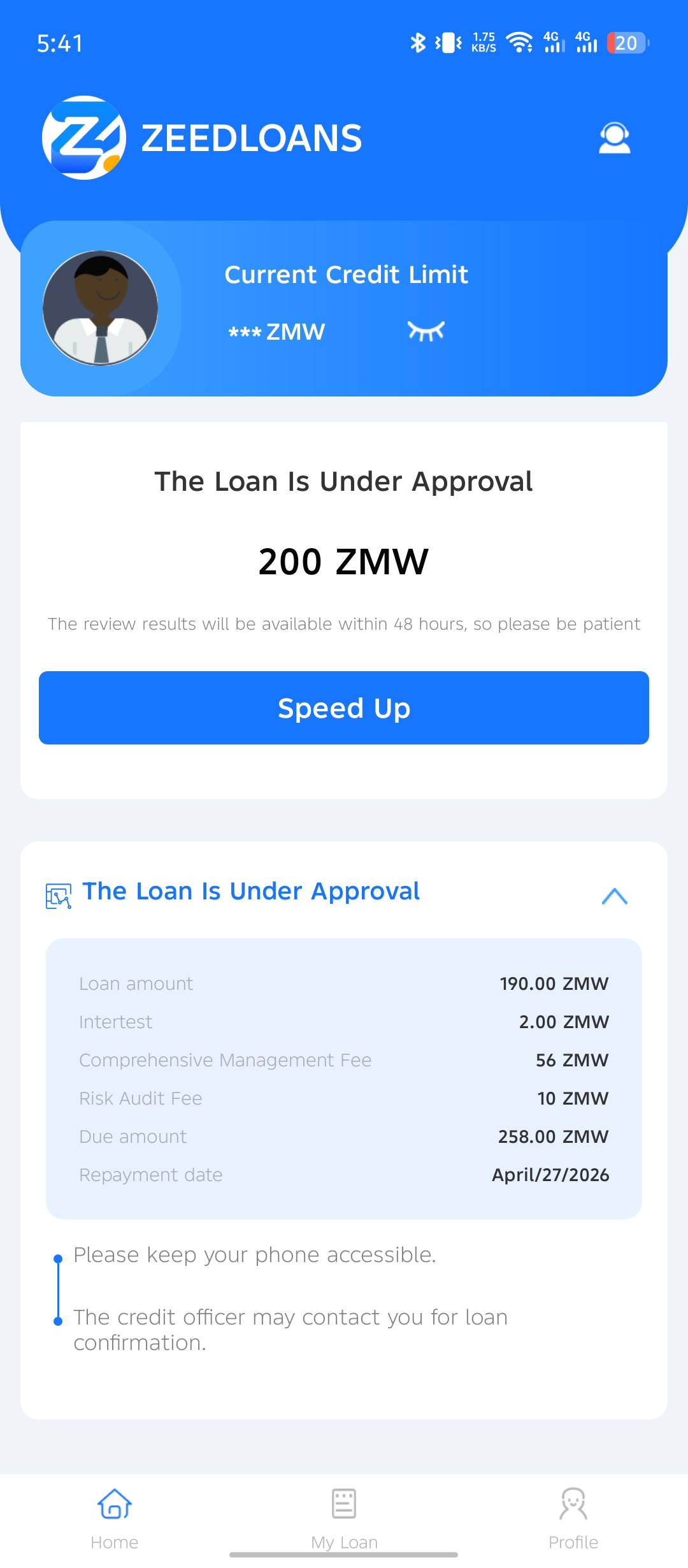
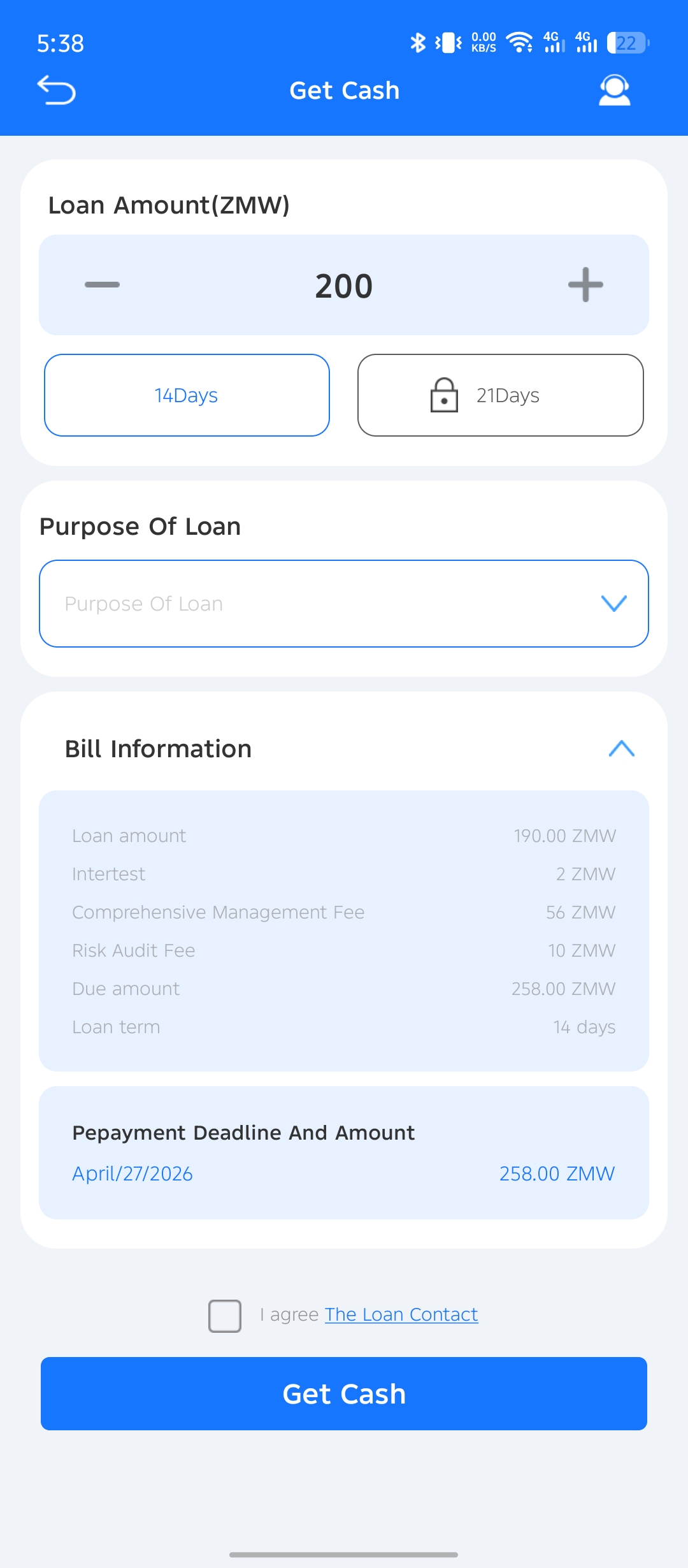
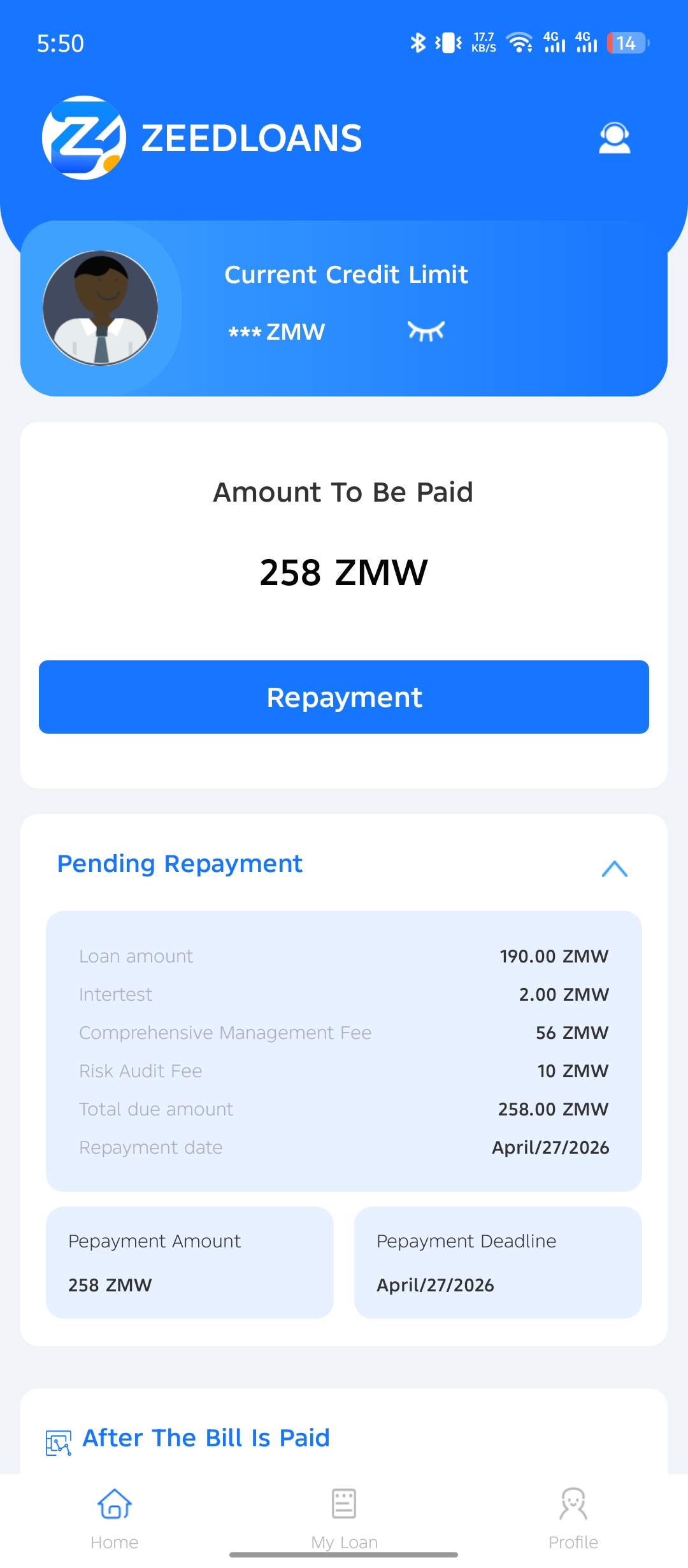
The interest rate is billed at 1%, but this is misleading since there is also a service charge is K56 on a loan amount of K200. This means for your very first loan, you will have to pay back K258 in total. This means you will effectively pay back 25 percent more than the principal loan amount.
On top of that, you will be charged a K10 Risk Audit Fee. The problem with this fee is that it is deducted from your loan amount at a 10% rate. This means if you borrow K200, you will only receive K190 as shown in the screenshot belowe.
How long does it take to receive your loan?
Once you submit your application, it takes under 10 minutes for you to receive your loan into your mobile Airtel or MTN money account. You will be called by an agent for a very short interview where you will be asked what you do for a living and where, and you will also be asked about the people you list as your next of kin.
They also ask if the people are aware that you have listed them in your application. As I will mention in the tips at the end of this review, the contact numbers you give for your next of kin should be active and reachable. In my application, I listed my mother and a workmate.
Speeding up your application
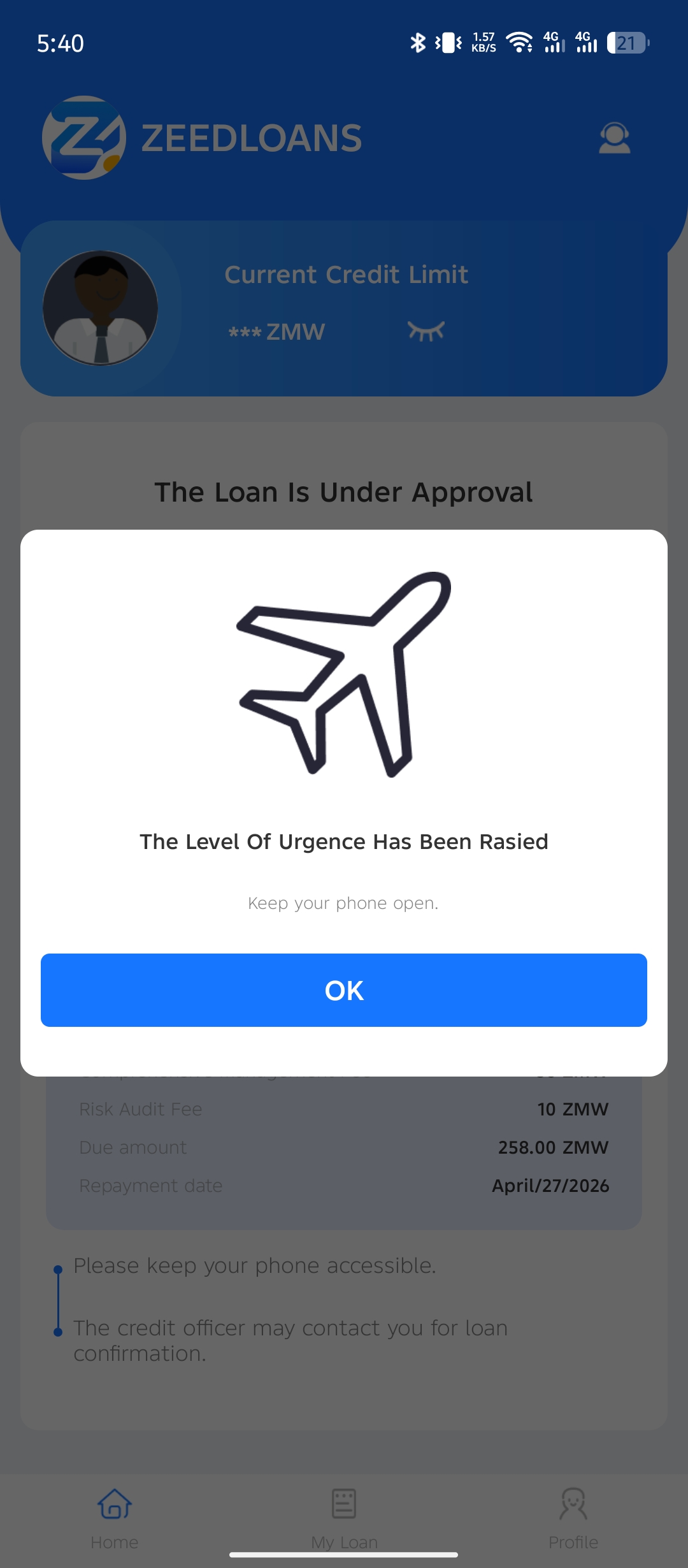
Zeed Loan has a feature called ‘Speed Up’. The button allows you to add priority to your application if it’s that much of an emergency. To be honest, though, I am not sure if this makes a difference and is just a strategic feature. I tapped on it, and my application was approved in under 10 minutes, including the interview. But I am not sure if that can be attributed to the speed-up button fact that they are just generally fast. I would advise you to press on it, though.
How to get a loan from the Zeed Loan App
Although the whole process is done right from your phone, the initial registration can be tedious. But this is all necessary since financial matters are sensitive, and the more information a loan company gets from you, the less risky you are to them.
Here is a detailed step-by-step guide on how to get a loan from Zeed Loans.
What documents do you need to provide?
All you need is your National Registration Card, which you will need to take a photo of.
You will also need to have two contacts they can reach out to if need be. I explain how to do this right towards the end of this review because this can be the difference between an approval and a rejection.
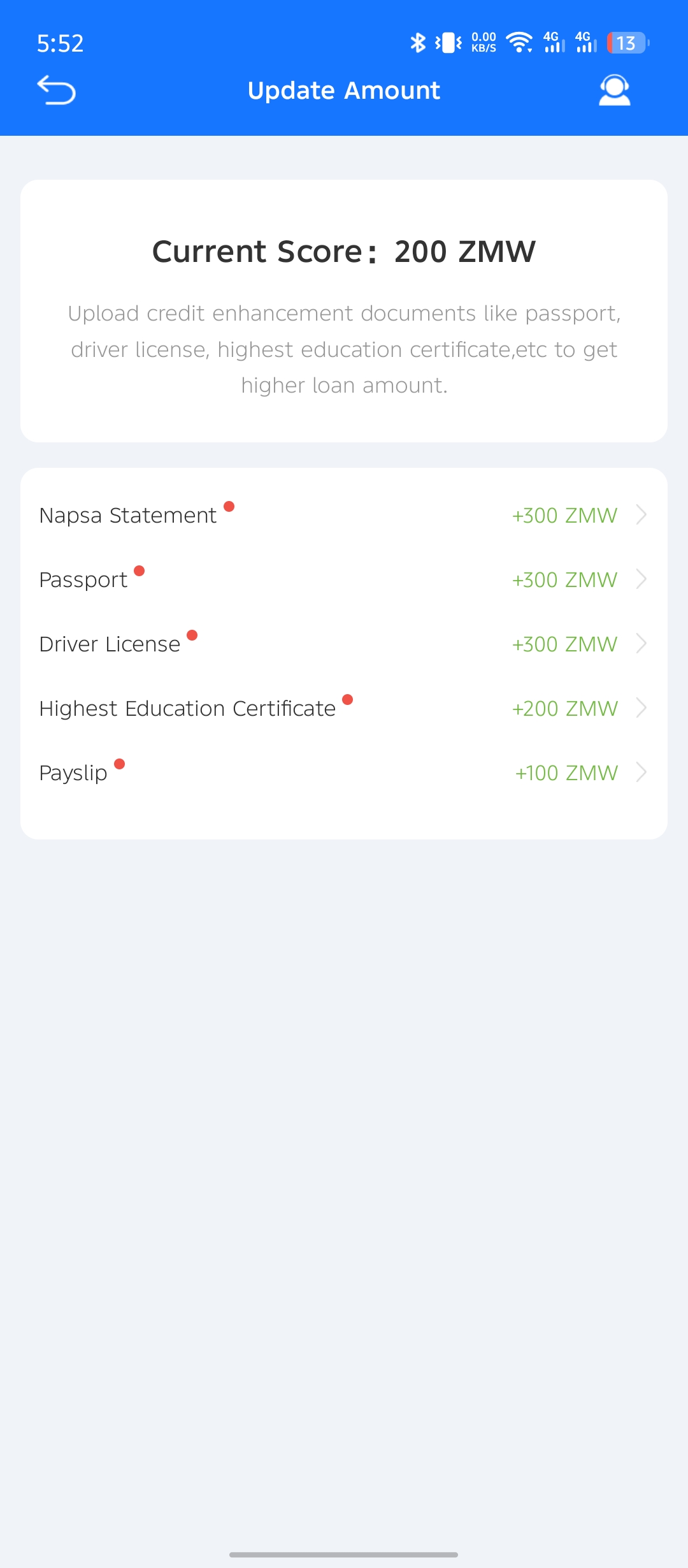
As you keep getting loans from Zeed Loans, the amount you are eligible for will keep growing until it reaches in the thousands of Kwacha. At that point, you will be required to submit more documents, such as your:
- Driver’s licence,
- Education certification, like your degree or diploma
- Bank statements,
- passport
- Napsa statement
- Payslip
Please note: These are not necessary if you are getting yout first loan. Submotting these documents only serve the purpose of increasing your credit score, granting you access to high loan amount. In fact, you will not have access to this feature until your loan amount grows to thousands of Kwacha.
Downloading the app
With your phone, go to the Play Store and search for ‘Zeed Loan’. Avoid going through Google search because there could be copycat apps trying to scam you. Alternatively, you can just click on the links I have included at the end of this article.
Filling in the details
Just be accurate, especially with details like your name, phone number, and NRC, since these should reflect what’s on the picture of your actual NRC.
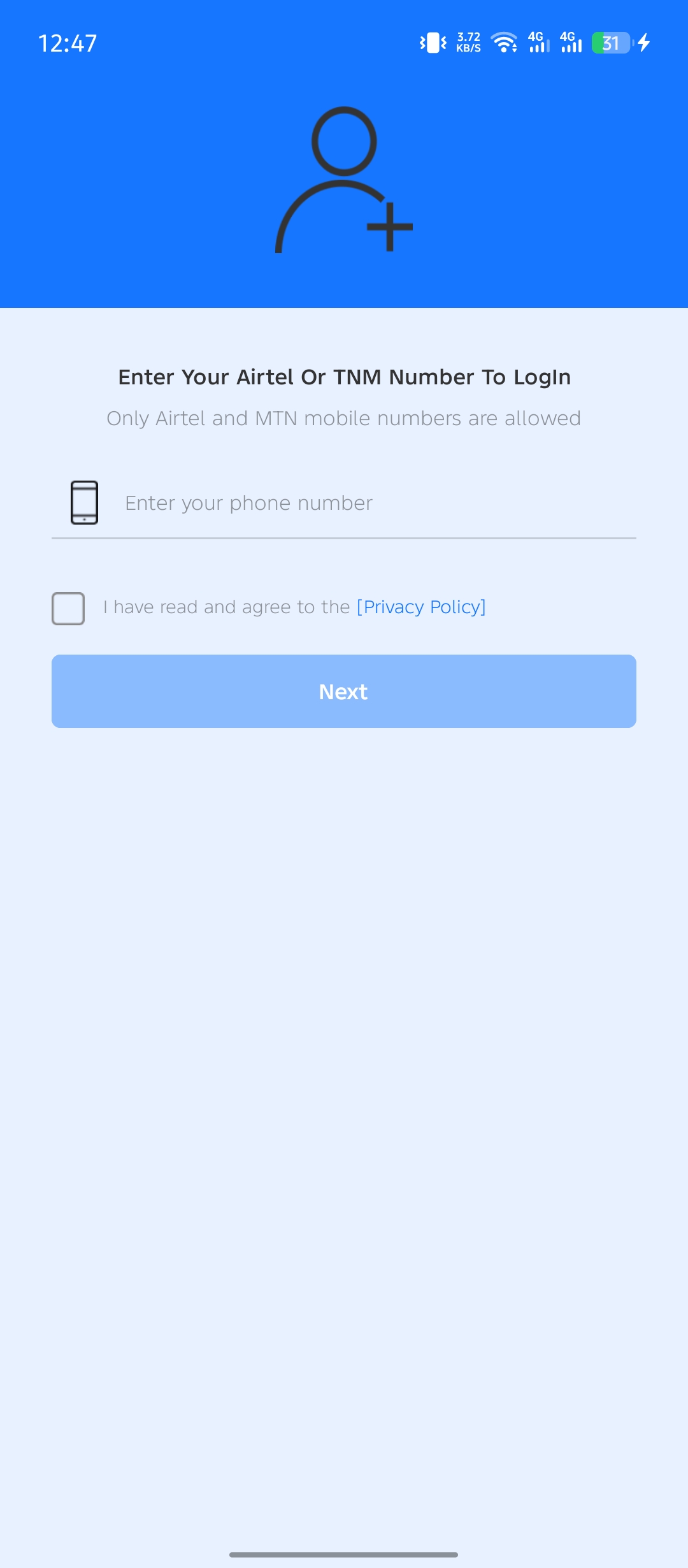
Page 1:
On page 1, you will be asked to provide
- Your MTN or Aiterl line. This is where your loan will be credited, so make sure you have access to it at the time of application. Your code will also be sent to this line.
-
Tap on ‘Privacy Policy’ to confirm that you understand and agree to their policy. It’s always prudent to read such documents, but it’s really not necessary. In the interview, you may be asked if you have read the policy. Just say yes, even if you did not read it.
Page 2
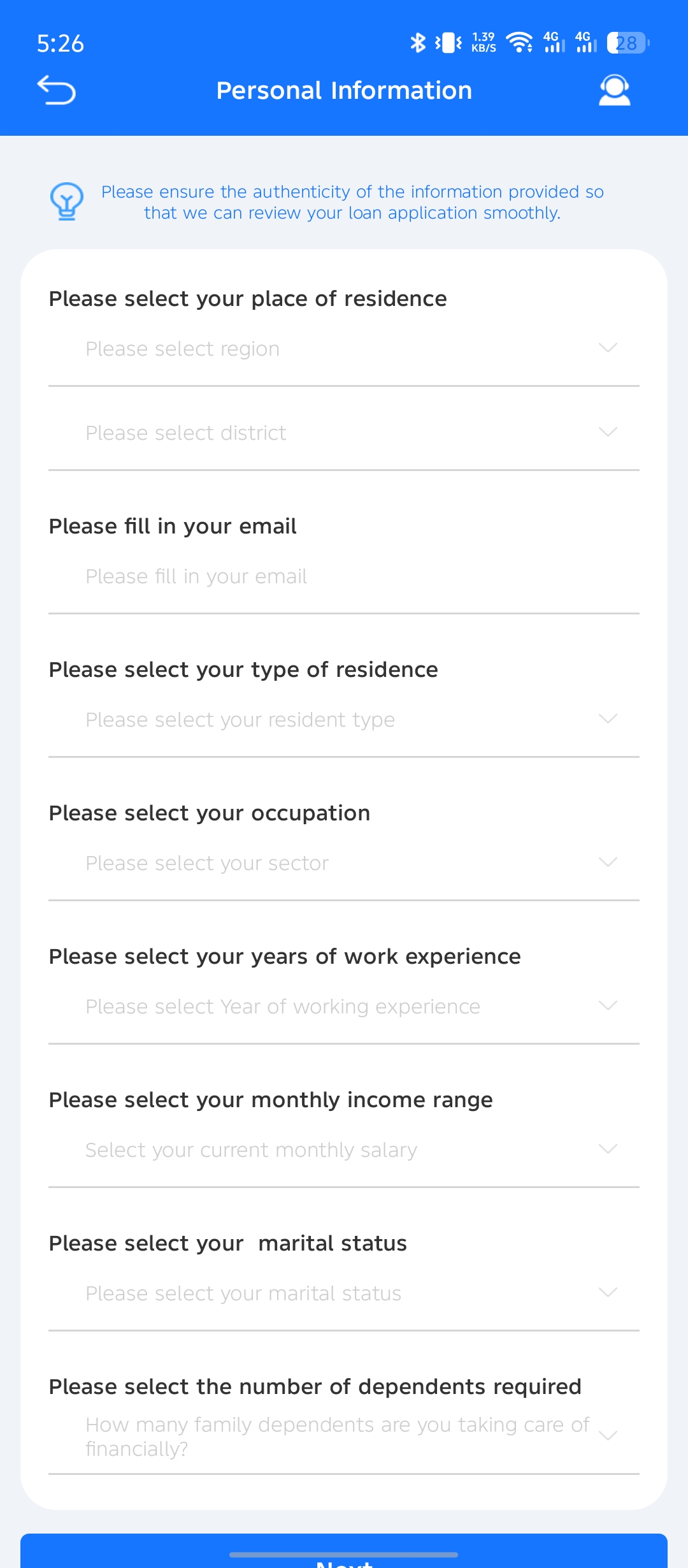
On page 2, you will be asked to provide:
- Your current province and city/town/district
- Your email address
- Your type of residence. Are you renting, do you own the house, or is it a family home?
- Your occupation. Not all types of jobs are listed, so just pick what is closest to your actual field of work. You will be able to specify this when you are called for an interview.
- Number of years you’ve been working
- Your monthly income. Select the range, whether it’s between K2500 to K5000, K5000 to K10000, etc.
- Your marital status
- Number of dependents. This part is about everyone depending on you including your children and anyone else you are keeping in your house.
Page 3
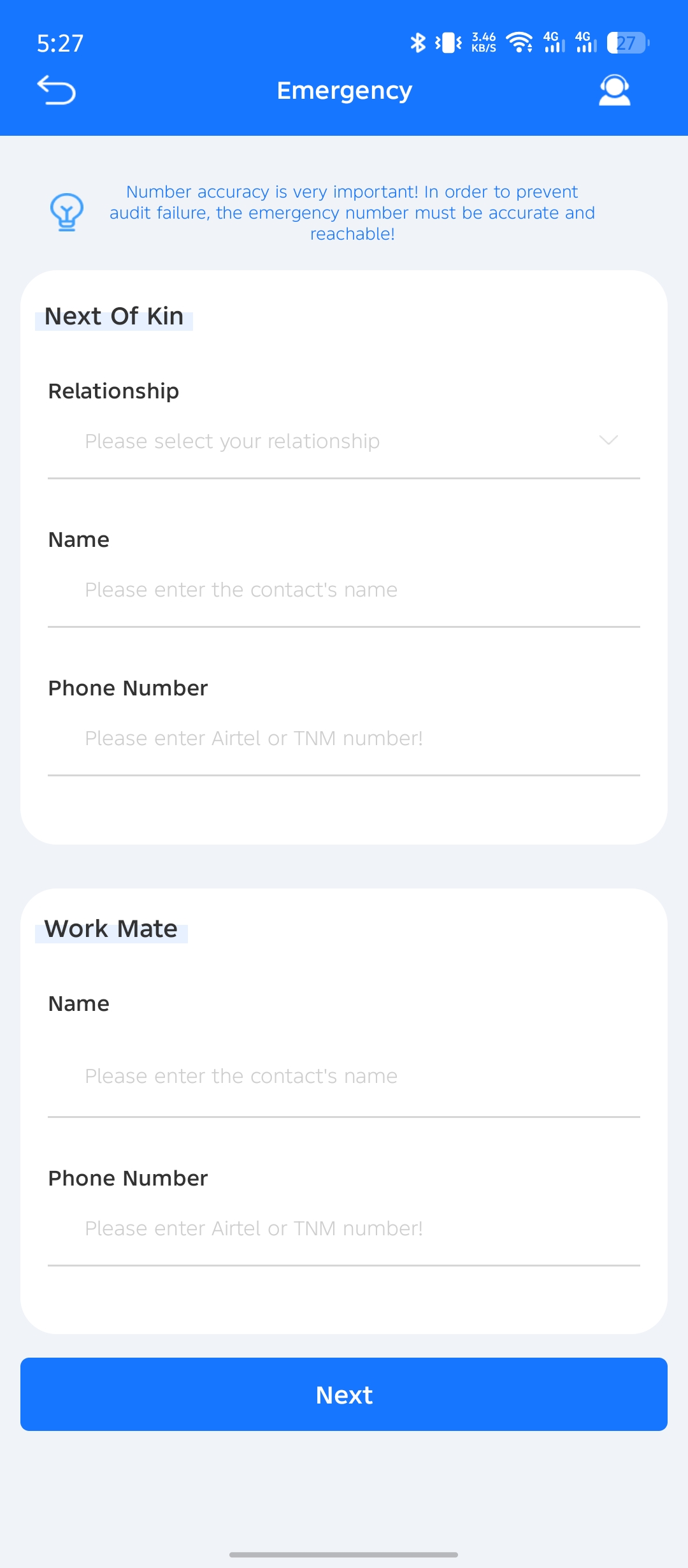
On page 3, you will be asked to provide:
- Full name of your next of kin
- Phone number of your next of kin
- The relationship between you and your next of kin
- The full name of your workmate
- The phone number of your workmate
Page 4
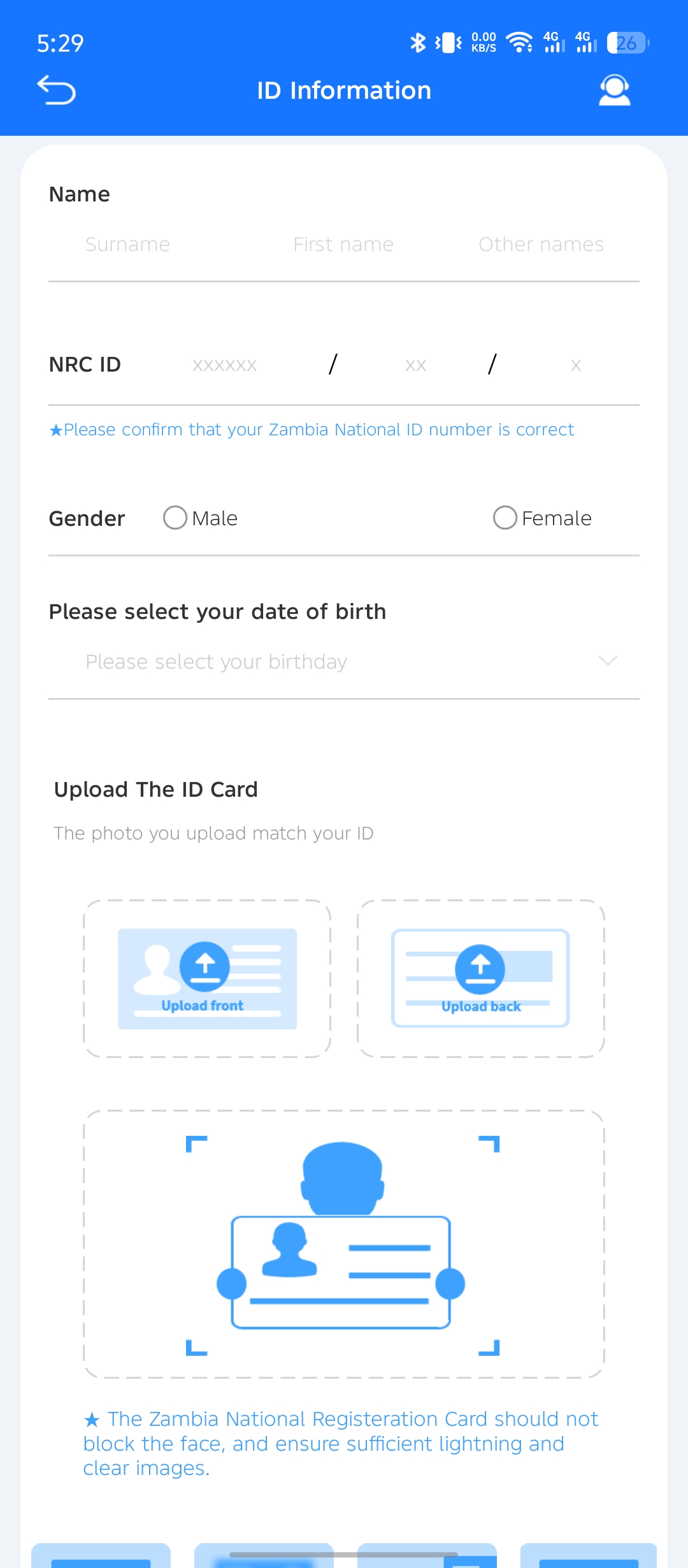
- On Page 4, you will be asked to provide:
- Your full names as they appear on your NRC
- Your NRC number
- Your gender
- Your birthday
- This information should be accurate ad reflect what’s on your NRC because you will upload pictres of it.
Uploading your NRC pictures
Right on page 4, you will be asked to upload pictures of your NRC.
- Make sure there is enough light. Personally, I prefer using natural light, but of course, any bright enough light will do.
- Make sure your NRC is not blocked by smudges or dirt.
- Be sure to keep the edge of the NRC within the provided box.
- When taking the pciture, you will get a blury image for a second or two until the camera focuses. Do not snao before the image is totally focused.
- Its best to avoid using the your phone’s camera flash since this causes glare, rendering the pitcure improsible to read.
Uploading the picture of you holding your NRC
After unploading your NRC’s front and back, you will now be asked to upload a picture of yourself holding your it.
- Once again, make sure there is enough light
- Both your face and your NRC should be sharply focused
- Be sure not to block your face with the NRC. Just hold it slightly under your chin
Page 5
Page 5 is where you choose how much you want. For your first loan, however, you are limited to K200. But you do get to choose the loan term, which can be either 14 or 21 days. At this point, you are almost done, and the last thing to do is just to choose the purpose of your loan. Options include medical emergency, business expense, groceries, etc.
The actual Zeed Loan contract
At the bottom of page 5, you will find a summary of your loan details. This your actual loan contract which you will be required to accept. It will show you:
- The amount you are borrowing
- The amount you will actually receive in your mobile money account
- The interest and loan term
- Comprehensive management fee
- Risk audit fee
If you are happy with the loan terms and conditions, proceed to check ‘ I agree to the loan contract’, then press ‘Get Cash’. This will send your loan for approval.
Page 6
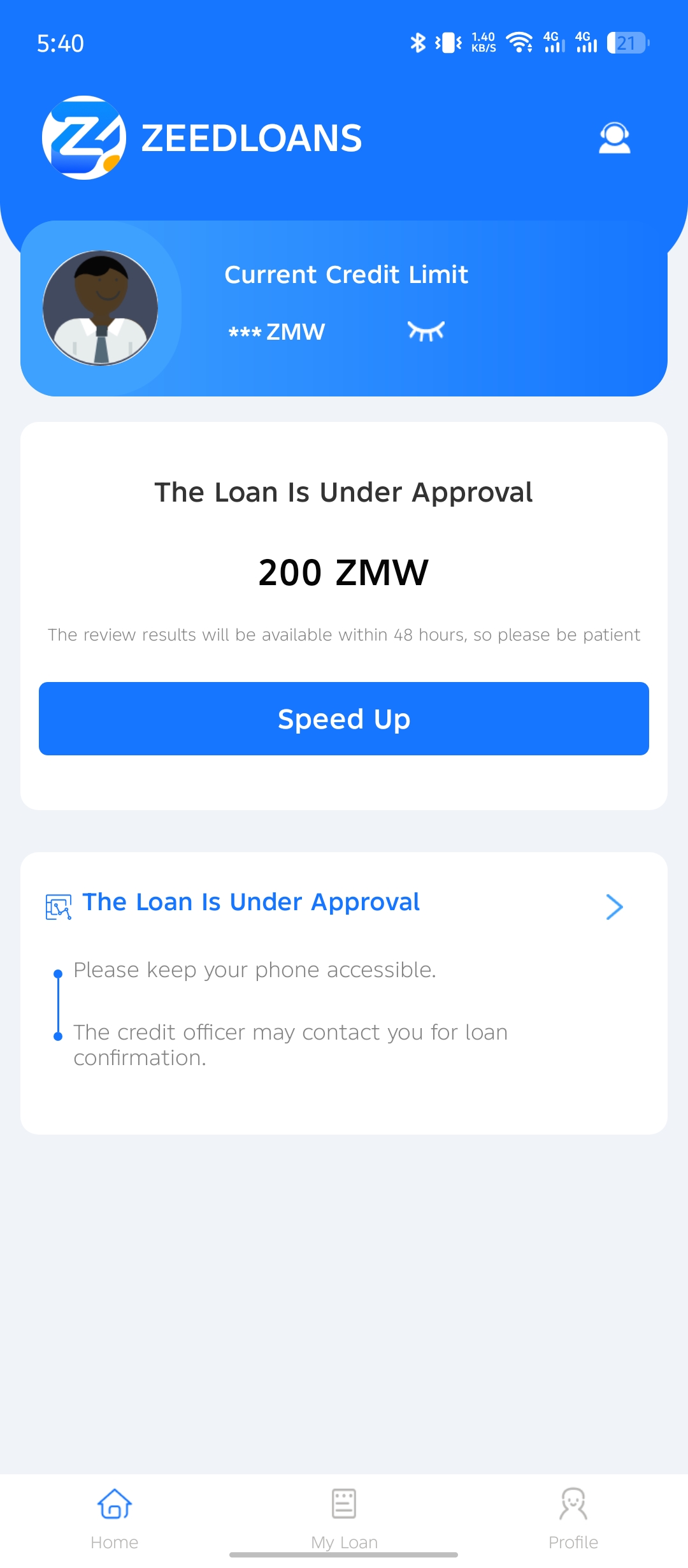
The next page will show that your loan is being reviewed. It seems their loan system first goes through your details to make sure you qualify, and then an actual human will take a look at your application. For your first loan, you will have to participate in a short interview.
Page 7
Zeed loan gives you the aility to raise the level of prioiyy for your loan application. You can tap ‘Speed Up’. This apparently pushes you aplicaton to the top for the reviewers to look at your application as soon as possible. In my experince, the loan only took less than 10 mintes from submitting the appliction to actually getting the money in my mobile money accounnt.
Page 7
Once your loan is approved, page 7 will show you your loan details, including the repayment schedule, interest, all fees, and the total amount you have to pay back.
Tips on getting your loan approved by Zeed Loan
- Make sure you get the details right
- When filling in the next of kin, be sure to add contacts that you frequently talk to in your call records. The Zeed loan app may check your call history to verify that you are in close contact with the numbers you give.
- When it comes time to take snapshots of your NRC, make sure you have enough light. In my experience, daylight is the best, but any bright enough light will do.
- If you are going to use your phone’s camera flash, be sure to angle it for the least glare.
- Switch on your location and grant the app access to it. This ensures you are indeed where you say you are. It increases your chances of approval.
Why did Zeed Loan reject my loan application?
Your loan application may be declined for several reasons, including:
Details not matching: The system will immediately flag you if the details on the NRC do not match the ones you fill in
Not having enough mobile money transaction messages: Having a long history of mobile money transactions can help prove that you are credit-worthy. It helps if the transactions are particularly large. on your phone to prove that you can manage to pay back
Having a poor credit score: Most mobile loan apps have access to different types of credit references. Those legit and Bank of Zambia-regulated ones may have access to the Credit Reference Bureau
Zeed Loan contact details and address
Phone:+260 974625319
Phone: +260779539664
Email: [email protected]
The Zeed Loan App is owned by Chibanje Capital Resources. Although the above contact number will lead you to the app’s specific customer service staff, you can also go through the mother company’s contact avenues.
Website: chibanjecapital.com
Online Chat: On the Chibanje Capital website
Email: [email protected]
WhatsApp: +260 962357946
Physical Address: Goldman House, Great East Road, First Floor, Plot No.58.